


Parental Control - Kidslox
4.01.75K Reviews
App Specs
- Version
- 11.1.3
- Updated On
- License
- Free
- Downloads
- 1,000,000+
- Developer
- Kidslox, Inc.
- Categories
- Parenting
- Platform
- Android
Screenshots
 Analysis by AppCompare
I see parental controls as a way to make household expectations easier to follow, not as a substitute for talking with a child. That distinction matters with Kidslox: it gives parents a place to manage device use, but the most useful results still come when everyone understands why a limit exists. I’d consider it when screen-time rules are hard to apply consistently across a family’s devices, rather than as a tool for secretly supervising everything a child does.
Where it fits in a family routine
Kidslox is a parenting app from Kidslox, Inc., built around managing children’s device use. Its current version is 10.9.1, and the product has been around since its release on August 21, 2015. That history gives parents a useful frame: this is an established app with a current version, but a version number alone doesn’t tell me which capabilities have changed or how a particular update affects a family’s setup. I’d check the controls available on my own devices and treat future changes as something to evaluate, not assume.
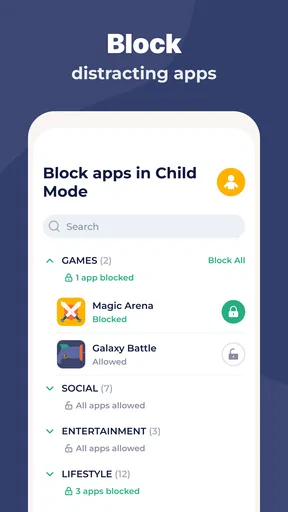
The app’s appeal is practical rather than flashy. A parent can use it to set boundaries around screen time, restrict apps or games, and arrange periods when devices should be put away. For a household where children use more than one device, the ability to manage multiple devices from one dashboard can reduce the need to repeat the same intervention on each one. That is most useful when the rules are shared and predictable: for example, devices are available after school, but not during dinner or bedtime.
There is a real trade-off in putting those rules into software. A schedule can make expectations consistent, yet it can also feel arbitrary to a child if nobody has explained it. I’d set the rules with the child where their age allows, then use the app to support the agreement. If a child needs a device for a legitimate task, a rigid restriction may create friction; a parent should be ready to review the rule rather than assume the control itself is always right.
What a normal day might look like
Imagine a school day when a child comes home, starts homework, and then drifts into games or videos. Instead of repeatedly asking them to put the device down, a parent can use planned limits and screen-free periods to make the transition clearer. The key is to build the schedule around the family’s actual day, not copy a strict template. A weekend, a school night, and a long trip may call for different expectations, and a tool works best when those differences are discussed rather than treated as exceptions to be fought over.
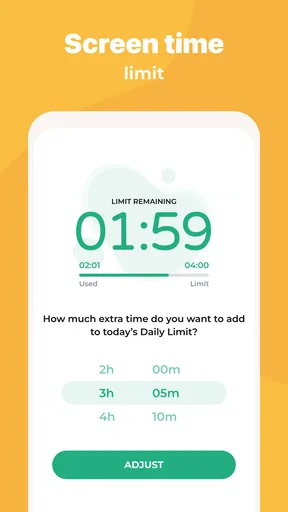
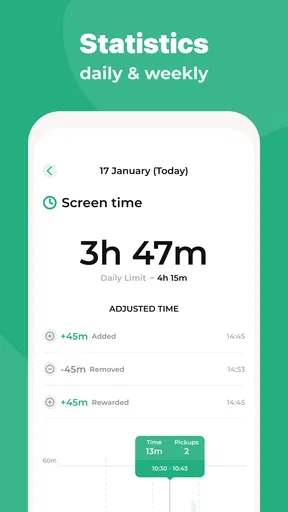
For a parent who wants to allow some screen time without turning every evening into a negotiation, a daily limit can provide a visible boundary. App blocking can also be more useful than a blanket ban: a family might want games unavailable during study time while leaving a device usable for an agreed purpose. That distinction is worth thinking through before enabling restrictions. If a child relies on one device for schoolwork or communication, a broad block could interfere with something important, so I would test the setup at a quiet time and confirm what remains accessible.
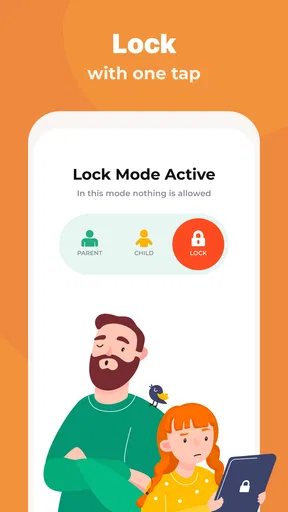
A one-tap lockdown can be convenient in an immediate situation, but I would use it sparingly. It may help when a family needs devices put aside at once, yet using it as a surprise punishment can undermine trust and make the child focus on getting around the rule. For routine transitions, a schedule is usually easier to understand; reserve a sudden lock for a genuine need, then explain it afterward. This is a small workflow choice, but it can make the difference between a control that supports family habits and one that becomes a new source of conflict.
Worth Reading Before You Choose

Flipboard Shows What News Apps Must Do Beyond the Feed

Switching to Android Auto Means Rethinking Your Driving Routine

Google Calendar Makes a Crowded Week Easier to Manage

Ludo King Makes the Most of the Minutes Between Plans

Baby Panda World Brings Quick Play to Modern Phones, but Its Game Library Feels Busy

ESPN’s Live Game View Makes Following Close Games Easier
How it compares with simpler options
Many families begin with the screen-time settings already built into a phone or tablet. Those can be enough if the household uses a small number of devices and a parent only needs basic limits on one platform. Kidslox is more appealing when a parent wants a central place to manage children’s devices and combine time boundaries with app restrictions. The convenience comes with another account and another layer to maintain, so I wouldn’t install it just to duplicate a rule that the device’s existing controls already handle well.
Compared with relying on verbal agreements alone, an app can make a routine more consistent, especially when parents have different schedules or find it difficult to enforce the same boundary every day. But software cannot judge context. It does not replace a conversation about why a child wants extra time, whether an assignment needs a device, or whether a limit should change as a child becomes more independent. If your main goal is to build self-management rather than apply firm restrictions, a jointly agreed plan and occasional check-ins may be a better fit than adding more controls.
Kidslox is free to download, with in-app purchases ranging from $0.99 to $129.99 per item. I’d look closely at the choices shown in the app before paying and decide which controls the family genuinely needs, rather than treating a subscription or purchase as automatically necessary. Its age rating is Everyone, but that rating describes the app’s audience classification, not whether every control is appropriate for every child. A younger child and a teenager may need very different levels of oversight.
Setting Up and First Impressions
Getting started with Kidslox was surprisingly straightforward. The app is available on both Android and iOS, and the installation process was a walk in the park. After a quick setup, I was able to link all of my kids' devices to my account. The interface is clean and intuitive, making it easy for even the least tech-savvy among us to navigate.
One of the standout features is the ability to manage multiple devices from a single dashboard. This means I can control screen time, block apps, and set daily limits without breaking a sweat. It's like having a remote control for my kids' digital lives.
Features That Make a Difference
What really sets Kidslox apart is its versatility. You can set daily screen time limits, block specific apps or websites, and even schedule screen-free times. This is perfect for ensuring that homework and family dinners are uninterrupted.
Another feature I found particularly useful is the option to toggle between "Parent" and "Child" modes. This allows me to temporarily override limits when needed, like during long car rides or special occasions. It's a flexible solution that adapts to real-life parenting needs.
Moreover, Kidslox supports a unique "Lockdown Mode" that restricts all device usage with just a tap. It's a godsend for those moments when you need to grab your child's attention quickly.
Making restrictions workable
Before connecting every device, I’d decide what each child actually needs access to and what should happen during shared family times. Setting one blanket rule for every child can seem tidy, but different ages, school needs, and routines may call for different boundaries. A short trial with one device can reveal whether a schedule interrupts homework, whether an app restriction is too broad, and whether the child understands what to expect. Adjusting early is easier than presenting a finished system as non-negotiable.
It also helps to distinguish between a time limit and a content boundary. A daily allowance addresses duration; blocking a particular app addresses access. Those solve different problems, and stacking both without a clear reason can make the device feel unusable. I’d start with the smallest set of rules that addresses the actual concern, then add another control only if the first one is not enough. That approach keeps the setup easier to explain and reduces the chance that a parent has to troubleshoot several restrictions at once.
When plans change, temporary flexibility matters. A long drive or a special family event can make the usual schedule inconvenient, so an override can be more sensible than repeatedly changing the underlying routine. I’d use that flexibility as an exception with a clear end point, rather than quietly extending the normal limit every day. If exceptions become frequent, that is a useful signal to revisit the schedule with the child instead of relying on overrides as the permanent solution.
Keeping trust alongside control
Parental-control apps raise a reasonable question: will a child see the limits as support or surveillance? My answer is that the way a parent introduces them matters as much as the settings. I’d explain which boundaries are being applied, what the child can still use, and how to ask for an adjustment when a task or family plan calls for one. A control that is visible and discussed is easier to live with than one that appears without warning.
I would also treat any usage information as a prompt for conversation, not a verdict on a child’s character. A busy day on a device might reflect entertainment, school tasks, or a mix of both. If a parent sees a pattern they want to change, asking what the child was doing is more constructive than assuming every minute was wasted. The app can help make a rule enforceable; it cannot supply the context or judgment that a parent brings to the situation.
This makes Kidslox a better fit for families who want consistent limits and are comfortable managing them actively. It is less suited to a household looking for invisible monitoring, or to parents who want a control system to make decisions without discussion. It may also be unnecessary if built-in device settings already cover the family’s needs. In that case, the simpler option means fewer settings to maintain and fewer chances of a restriction colliding with an everyday task.
Questions worth settling before relying on it
Parents often want to know whether one account can cover the devices used by several children, whether a limit can be adjusted for a one-off event, and whether blocking apps will leave school tasks workable. Kidslox’s multi-device dashboard and the described mode controls speak to those practical needs, but I’d still verify the behavior on each child’s device during setup. Try the schedule, check the apps that matter, and make sure you know how to change a rule before relying on it for a busy weekday.
Another sensible question is whether it is free in practice. The app is free to download, while optional in-app purchases are listed from $0.99 to $129.99 per item. That broad range makes it especially important to inspect the purchase choices inside the app and compare them with the controls you intend to use. I would not pay simply because a parental-control app feels more complete when upgraded; I’d first identify a specific need that the free setup does not meet.
Kidslox has an average rating of 4.2 from around 36,000 ratings, with roughly 1,700 written reviews and more than a million installs. Those figures suggest that many families have tried it, but they cannot tell me whether its restrictions will match a particular device mix or parenting style. I’d use other parents’ experiences as clues about possible setup frustrations, then judge the app against my own household’s routine.
Peace of Mind with Security
The app also prioritizes security, which is something I always look for. All communications are encrypted, and Kidslox doesn’t collect personal data, ensuring your family's privacy is protected. It's comforting to know that while I'm keeping tabs on my kids, my data isn't being shared with third parties.
Room for Improvement
While Kidslox is a solid app, it's not without its quirks. Some parents might find the premium subscription necessary to unlock all features. However, considering the peace of mind it provides, I found it to be a worthwhile investment.
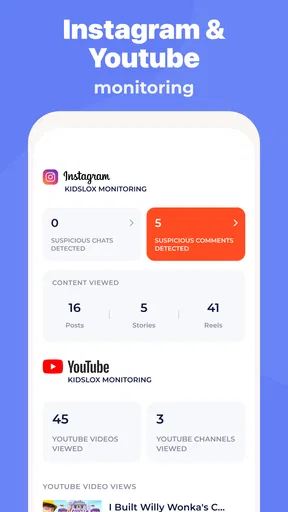
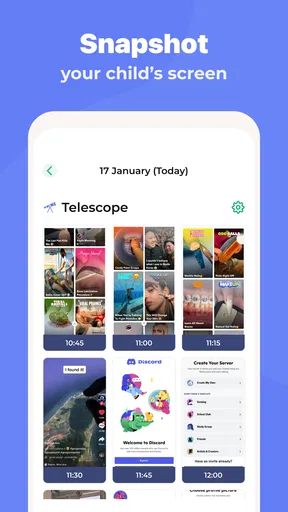
Additionally, the app could benefit from a more robust reporting feature. Although it provides basic insights into usage patterns, more detailed analytics would be helpful for parents who want to dig deeper into their kids' digital habits.
Those limitations shape what I would watch for as the product evolves. Since version 10.9.1 is the current release, I’d look at each future change in terms of whether it makes daily management clearer, improves the usefulness of reports, or reduces setup friction. A larger feature set is not automatically better for parents; what matters is whether a change solves a real household problem without making controls harder to understand. Existing users should review settings after an update rather than assume their family’s routine still fits unchanged.
My final view is that Kidslox is most useful when a family wants one practical place to apply agreed screen-time boundaries across children’s devices. It can help a parent move from repeated reminders to a more predictable routine, but it works best when limits are explained, tested, and adjusted as children’s needs change. If you want detailed insight into every aspect of a child’s digital life, or prefer a completely hands-off approach, I’d look elsewhere or start with the controls already built into the devices. For families who need consistent limits and are willing to manage them thoughtfully, it is a reasonable option to try.
Overall, Kidslox is a reliable ally in the modern parenting landscape. It's not just about control; it's about teaching kids healthy tech habits. If you're looking for a way to manage screen time effectively, give Kidslox a try. It might just be the helping hand you've been searching for.
Pros
- User-friendly interface for easy navigation.
- Comprehensive time management features.
- Multi-device compatibility across platforms.
- Customizable content filters for safety.
- Remote control access for flexibility.
Cons
- Limited free version features.
- Some advanced settings are complex.
- Requires internet for full functionality.
- Occasional syncing issues reported.
- Subscription can be pricey for families.
FAQs for Parental Control - Kidslox
What is Kidslox and how does it work?
Kidslox is a parental control app designed to help parents manage and monitor their children's device usage. It works by allowing parents to set screen time limits, block apps, filter content, and track device usage. The app provides a user-friendly interface where parents can customize settings and receive reports on their children's activities.
Is Kidslox compatible with both Android and iOS devices?
Yes, Kidslox is compatible with both Android and iOS devices. This cross-platform compatibility ensures that parents can manage multiple devices from a single account, regardless of the operating system. Parents can easily download the app from the Google Play Store or Apple App Store and link devices for comprehensive control.
What features does Kidslox offer to ensure child safety online?
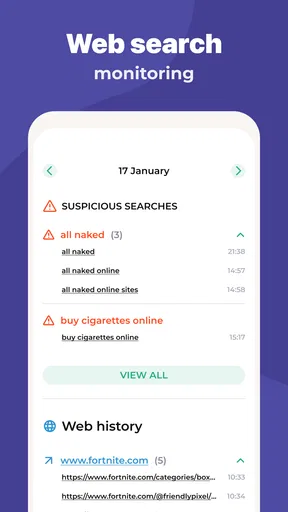
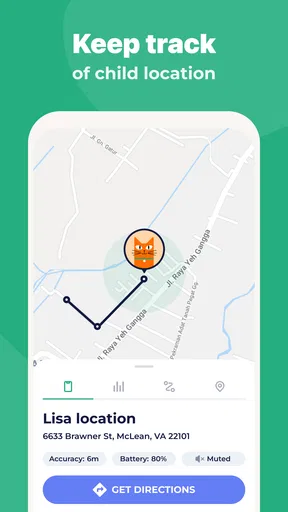
Kidslox offers a variety of features to ensure child safety, including app blocking, web filtering, and screen time scheduling. Parents can block inappropriate content, restrict access to certain apps, and set daily limits on device use. Additionally, the app provides location tracking and usage reports to keep parents informed about their children's online activities.
How does the screen time management feature work in Kidslox?
The screen time management feature in Kidslox allows parents to set daily limits on how long their children can use their devices. Parents can create custom schedules for weekdays and weekends, ensuring a balanced approach to screen time. Alerts and notifications help both parents and children adhere to these limits, promoting healthier device habits.
Can Kidslox be bypassed by tech-savvy children?
While Kidslox is designed to be robust, no parental control app is completely foolproof. However, Kidslox employs several security measures to prevent easy bypassing. These include password protection, app uninstall prevention, and regular updates to address potential vulnerabilities. Engaging children in discussions about online safety can also reinforce the app's effectiveness.


